
Download Back4Sure – Simple, Secure Backup Tool for Windows
Overview of Back4Sure
Back4Sure is a lightweight backup utility designed for users who want a no‑frills solution to protect their critical files. The interface mirrors the familiar Windows Explorer layout: a folder tree on the left and a series of configuration tabs on the right. By simply dragging or clicking to select folders, you can create a backup job in seconds.
The program supports file‑level filters based on extension, size, and modification date, allowing you to exclude temporary files, caches, or any other unwanted data. Back4Sure employs incremental backups, meaning only the files that have changed since the last run are copied, which dramatically reduces both backup time and storage consumption. For those concerned about disk space, the tool also offers optional compression, packing the backup set into a single, smaller archive.
While the lack of an automated scheduler may turn away power users, the ability to launch jobs via desktop shortcuts compensates for basic automation needs. Overall, Back4Sure delivers a straightforward, secure way to keep copies of documents, photos, and project files without the learning curve of enterprise‑grade solutions.
Key Features That Set Back4Sure Apart
- Intuitive Folder Picker: Mirrors the native Windows file manager, letting you select source folders with a single click.
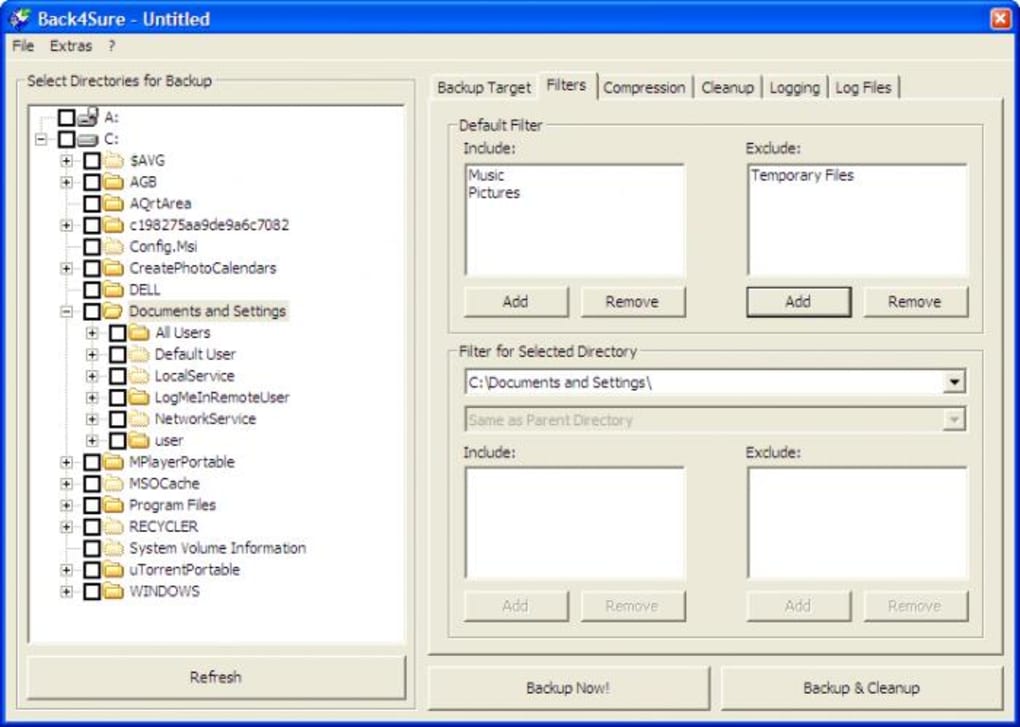
- Powerful Filtering Engine: Include or exclude files by extension, size range, or last‑modified date, giving you granular control over what gets backed up.
- Incremental Backup Logic: Only new or changed files are copied after the first full backup, saving time and reducing wear on storage media.
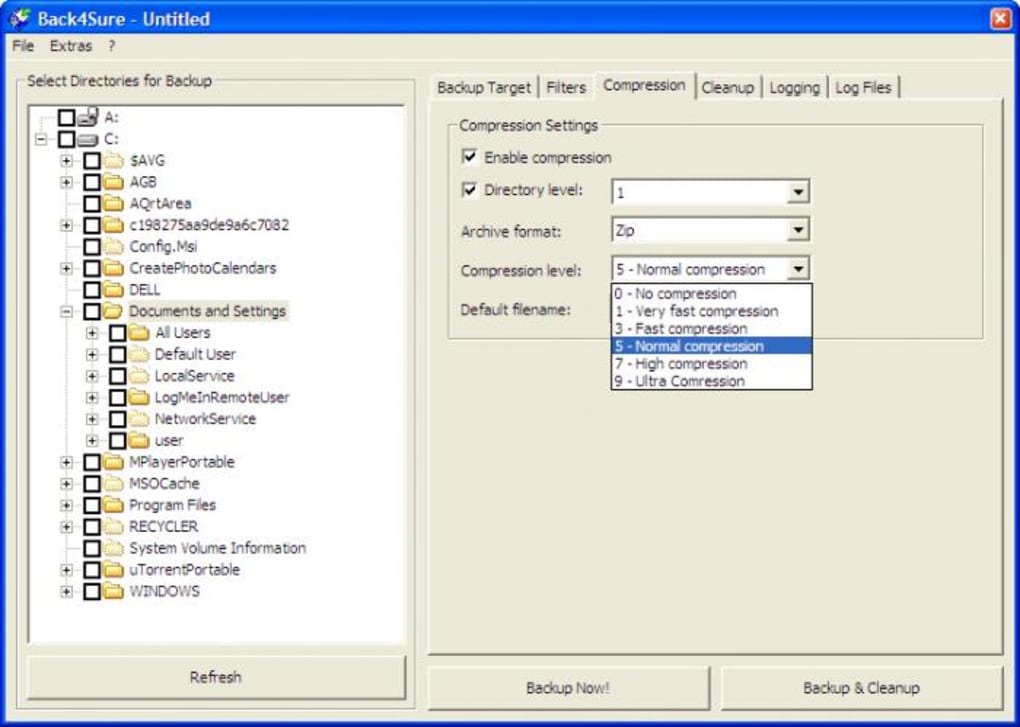
- Built‑in Compression: Option to compress backup sets into ZIP‑compatible archives, freeing up valuable hard‑drive space.
- Portable Job Shortcuts: Create desktop shortcuts for frequently used backup jobs, enabling one‑click execution without navigating the UI.
- Secure Copy Process: All data is transferred locally; no internet traffic is involved, ensuring privacy and compliance with data‑protection policies.
- Lightweight Footprint: The installer is under 5 MB and runs with minimal RAM usage, making it ideal for older PCs or low‑spec laptops.
- Free to Use: Back4Sure is offered at no cost, with all core features available without hidden fees or trial periods.
Step‑by‑Step Installation and Usage Guide
Downloading and Installing
1. Visit the official Back4Sure download page and click the Download for Windows button.
2. Once the Back4Sure_Setup.exe file is saved, double‑click to launch the installer.
3.
Follow the on‑screen wizard: accept the license agreement, choose the destination folder (the default C:\Program Files\Back4Sure works for most users), and click Install.
4. After installation, a shortcut appears on the desktop and in the Start menu. Launch the application to begin configuring backups.
Creating Your First Backup Job
1. In the left pane, navigate to the folder you wish to protect (e.g., C:\Users\John\Documents). Click the check‑box to add it to the backup list.
2.
Switch to the Filters tab. Here you can add rules such as “Exclude *.tmp” or “Include only files larger than 1 MB”. Use the Add Filter button to stack multiple criteria.
3.
Move to the Destination tab. Choose a target location—another internal drive, an external USB stick, or a network share. If you enable compression, the tool will automatically create a .zip file in the selected folder.
4.
Click Run Backup. The first run performs a full copy; subsequent runs will be incremental, copying only the altered files.
5. For quick access, right‑click the job name in the list and select Create Shortcut.
The shortcut can be placed on the desktop for one‑click launches.
Troubleshooting Common Issues
If a backup fails, check the Log tab for error messages. Typical problems include insufficient permissions on the destination drive or files locked by other applications. Ensure the target folder has write rights and that no antivirus software is blocking Back4Sure’s file‑write operations. Because the program runs locally, there is no need for internet connectivity, which eliminates many network‑related errors.
Compatibility, Pros & Cons, FAQ, and Final Thoughts
Operating System Support
Back4Sure is built for Microsoft Windows 7, 8, 8.1, 10, and 11 (both 32‑bit and 64‑bit). The installer detects the appropriate architecture automatically. Although a macOS or Linux version is not available, the program runs seamlessly on any modern Windows PC, including older hardware that struggles with resource‑heavy backup suites.
Pros and Cons
- Pros:
- Extremely easy to set up—no steep learning curve.
- Incremental backups save time and storage.
- Filters give precise control over what gets backed up.
- Optional compression reduces archive size.
- Free, with all core features unlocked.
- Cons:
- No built‑in scheduler; users must launch jobs manually or via shortcuts.
- Limited to Windows; no native macOS or mobile versions.
- No cloud integration for off‑site backups.
Frequently Asked Questions
Can I back up to an external USB drive?
Yes. In the Destination tab, simply select the external drive letter. Back4Sure treats any mounted volume as a valid target, and the incremental logic works identically to internal drives.
Is the compression lossless?
Back4Sure uses standard ZIP compression, which is lossless. All files can be restored to their original state without any quality degradation.
How does Back4Sure handle file permissions?
Permissions are preserved in the backup archive when compression is enabled. When you restore, the original NTFS permissions are reapplied, provided you run the restore with administrative rights.
Can I exclude hidden system files?
Yes. The filter interface includes a checkbox for “Exclude hidden/system files.” Enabling this prevents Windows system folders like System Volume Information from being copied.
Is there a way to schedule backups automatically?
Back4Sure does not have an internal scheduler. However, you can use Windows Task Scheduler to launch a backup shortcut at defined intervals, effectively automating the process.
Conclusion & Call to Action
If you’ve been searching for a straightforward, free backup tool that respects your time and storage, Back4Sure fits the bill perfectly. Its drag‑and‑drop interface, robust filtering, and incremental logic make routine backups painless, while optional compression helps you stretch limited disk space. Although power users may miss a built‑in scheduler and cloud sync, the ability to create desktop shortcuts and leverage Windows Task Scheduler provides a practical workaround. Download Back4Sure today, set up your first backup in under five minutes, and enjoy peace of mind knowing your important files are safely duplicated.
Pros: Easy UI, incremental backups, compression, free.
Cons: No native scheduler, Windows‑only, no cloud storage.







